✨ Twelvetooo HW07D
📱 Advanced Controls: App, Music Sync & Smart Features
For: Users who want full customisation · Goal: Unlock the Surplife App, master the remote, and sync lights to music.
You've already set up your HW07D and enjoyed the basic firefly effects. But the real magic begins when you dive deeper — into the App, the remote's hidden functions, and the music sync mode. Here's everything you need to know.
🎬 See the Magic in Action
Surplife App — control from anywhere
White laser — starry sky effect
🎵 Music sync in action — lights flashing with the rhythm
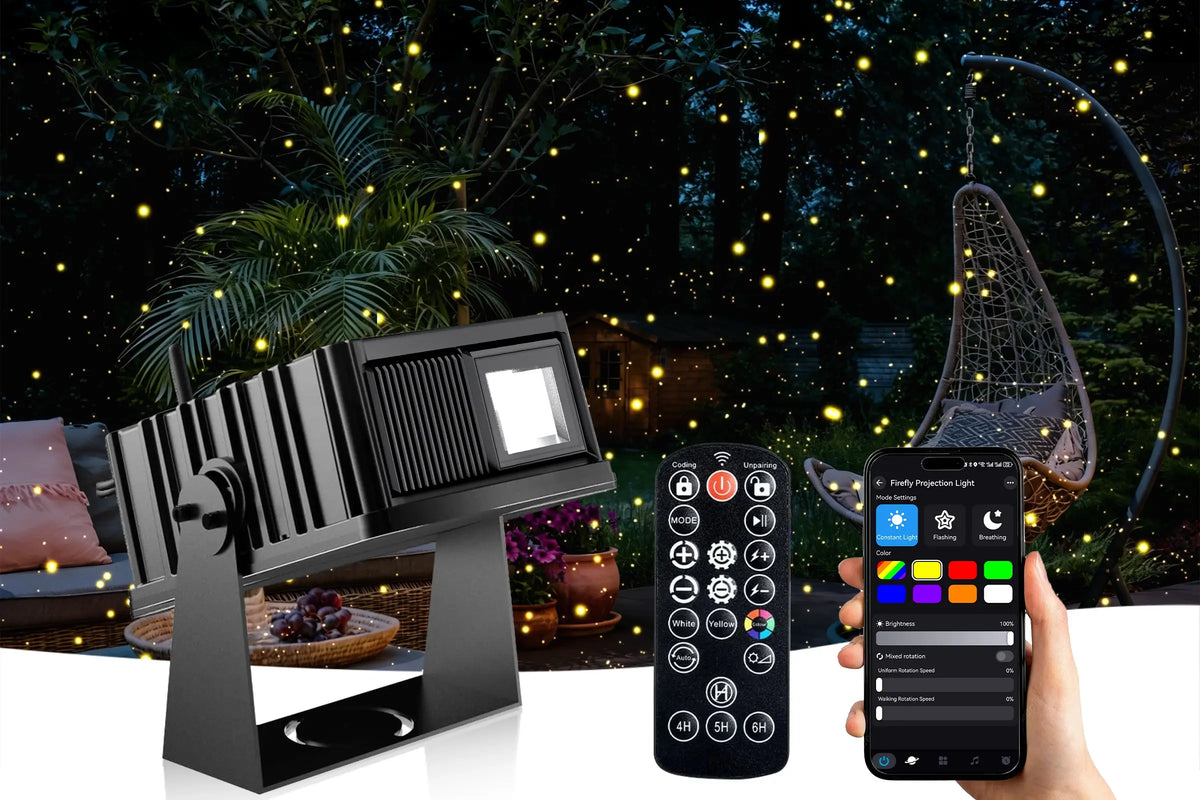
📱 1. Surplife App — Total Control at Your Fingertips
The HW07D connects to the "Surplife" App (available on iOS and Android) via Bluetooth with a range of up to 40 metres. Here's what you can do from your phone:
- ⏰ Smart timer — Set automatic on/off schedules (e.g. 7:00 PM on, 11:00 PM off, every day)
- 🎨 16 million colours — not just 7 presets; pick any hue you like
- 📊 Smooth sliders for brightness and speed — more precise than physical buttons
- 🎵 Music‑sync mode — the built‑in microphone picks up ambient sound, and the fireflies dance to the beat
How to connect:
- 📲 Scan the QR code from the manual to download "Surplife" App, or find it on the Apple/Google Store
- 📶 Turn on Bluetooth on your phone and open the App
- 🔍 Tap "Add Device" — your phone will automatically search for nearby devices
- ✅ Tap your HW07D and follow the on-screen prompts to complete pairing
🎮 2. 2.4G Remote — Quick Adjustments from 30 Metres Away
When you don't want to pull out your phone, the 2.4G remote control offers a quick and reliable alternative with a range of 30 metres. Here are the key buttons:
| Button | Function |
|---|---|
| Power | Turn the unit on / off |
| MODE | Cycle through 8 auto modes (pattern / random combinations) |
| Brightness | Adjust brightness levels (100% → 75% → 55% → 25% → cycle) |
| Speed | Control motor rotation speed (stop → slow → medium → fast) |
| Stepping | Step rotation mode (stop → slow → medium → fast) |
| Flicker | Strobe speed (steady → slow → medium → fast) |
| White / Yellow | Switch directly to white or yellow light |
| Color | Cycle through 7 colors: White → Yellow → Red → Green → Blue → Purple → Orange |
| Auto‑cycle | Colors automatically transition through the 7‑color cycle |
| 4H / 5H / 6H | Set auto shut‑off timer (restarts after 20/19/18 hours) |
| Cancel Timer | Cancel the current timer setting |
🔘 3. On‑Board Buttons — Quick Direct Access
The HW07D also features a simple power button on the unit itself:
- Short press — Turn the unit on or off
- No complex menus to navigate — just pure simplicity
This is perfect for quick on/off control when the remote isn't nearby.
🎵 4. Music Sync — Your Party's Best Friend
When you're hosting a party or celebration, simply turn on the voice control mode through the remote or App. The lights will flash with the rhythm of the music — creating a unique light show that enhances any gathering.
This isn't just a technical feature — it's what transforms a beautiful light into an immersive, emotional experience for parties, weddings, and celebrations.
🌿 5. Multi‑Unit Sync — For Large Venues
For spaces larger than 200㎡ (like a 60 ft × 60 ft hall), a single HW07D may not cover every corner evenly. Our recommendation:
- 📌 Place two units diagonally opposite each other
- Use the App to sync both devices — same colour, same mode, same rhythm — for a unified, immersive atmosphere
🔋 6. Smart Timer — Set It and Forget It
The HW07D features an intelligent auto‑cycle system:
- ⏰ When powered on, it automatically shuts down after 6 hours
- 🔄 After shutdown, it automatically restarts 18 hours later (without manual intervention)
- 🎛️ You can also override this with the remote's 4H / 5H / 6H timer buttons
- 📱 The Surplife App gives you even more flexible timer scheduling
🛠️ 7. Warranty & Support
Every HW07D comes with:
- ✅ 18‑month warranty — peace of mind included
- ✅ 30‑day risk‑free trial — not satisfied? Return it
- ✅ Free shipping on orders over $70
- ✅ Rigorous testing before leaving the factory
If you experience any issues — whether it's a connection problem, a hardware glitch, or just a question — we're here to help.
• Email: Service@twelevetooo.global (available 24/7)
• Live Chat: 10:00 AM – 6:00 PM (GMT+8)
• US Phone: +1 213 498 6666
📄 For full specifications (power, operating temperature, dimensions, etc.), download the manual: HW07D User Manual (PDF).
Twelvetooo — More than just a light, it's a feeling.
© Twelvetooo. All rights reserved. | twelvetooo.global


Share:
Do You Need Wi‑Fi or an App to Use a 3D Holographic Projector?
How to Light Trees & Turn Your Backyard into a Firefly Wonderland